









What You'll Learn in This Article
This article explains the four quality presets of the “XYN Venus Algorithm” provided by XYN Spatial Scanand how to choose the appropriate one based on your output destination.
*The screen images shown on this page may differ from the actual display depending on the version.
What Are Quality Presets?
The XYN Venus algorithm offers four quality presets: Basic Quality, Enhanced Quality, Advanced Quality, and Extreme Quality. Choose one according to how you plan to use the 3DCG asset, starting with its final output destination.
Basic Quality is the baseline. For viewing on a monitor, Basic Quality is all you need. When the image is enlarged across a large LED wall, Extreme Quality is the better fit, since it holds more resolution in distant scenery.
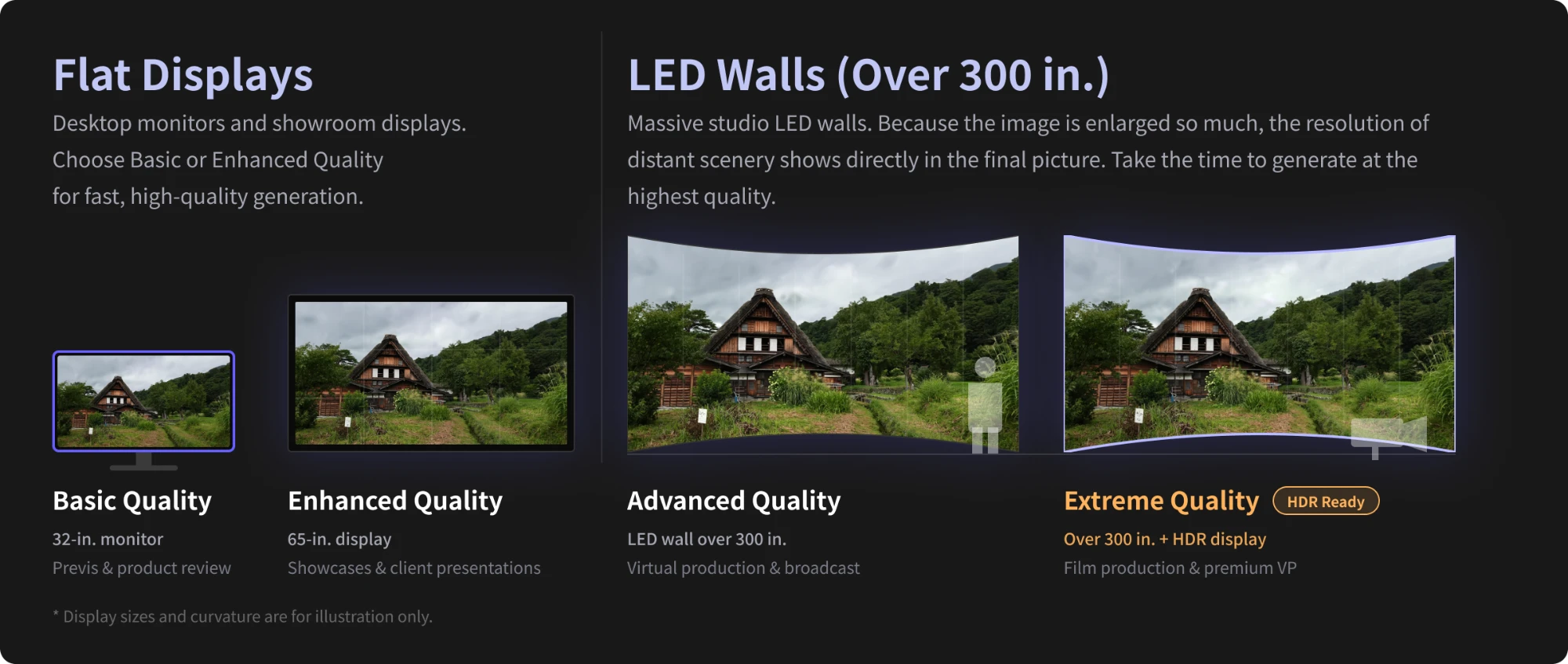
Quality Preset Quick Reference Table
|
Preset |
Intended Output |
Suitable Teams |
Main Uses |
Estimated Token |
|
Basic |
32-inch Monitor |
Design and Production Teams |
Desktop pre-visualization (pre-verification), product evaluation, and team reviews |
Approx. 150* |
|
Enhanced |
65-inch Display |
Marketing, Retail, Showrooms |
Product showcases and customer presentations on large displays |
Approx. 200* |
|
Advanced |
Over 300-inch CurvedLEDWall |
Virtual production, broadcasting, and live production |
Virtual production and broadcasting applications requiring high frame rates |
Approx. 1,700* |
|
Extreme Quality |
Over 300 inches , Curved +HDR |
Film Production, Premium Virtual Production, Broadcasting |
Highest-fidelity rendering for HDR displays and film production |
Approx. 2,000* |
Advanced Quality and Extreme Quality are both intended for output on screens over 300 inches. For green screen or LED backgrounds in virtual production, Advanced Quality is usually the right choice. If your workflow includes HDR and close-up shots need to stay sharp, choose Extreme Quality. Extreme Quality is the only preset that supports high dynamic range (HDR).
Taking Basic Quality as 1, Enhanced Quality uses about 1.3 times as many tokens, Advanced Quality about 11 times, and Extreme Quality about 13 times. Token consumption rises sharply from Advanced Quality upward, so decide whether you are outputting to a screen over 300 inches before you choose.
*Token figures are current as of the time of writing. Check the application for the latest values.
*The display sizes listed are guidelines for the intended output destination.
Estimated Tokens per Generation
Tokens are consumed when you generate a 3DCG asset in XYN Spatial Scan. How many you use depends on the quality you generate at.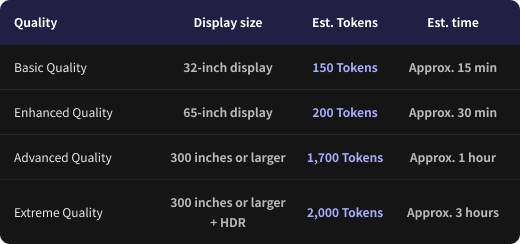
*These figures assume 110 input images. Token consumption and generation time vary with the number of images, their resolution, and the generation settings.
*When access is concentrated or the servers are busy, generation may take longer than usual.
How to Choose
- Decide where the finished asset will ultimately be shown (a desktop monitor, a large-format display, or a curved LED wall over 300 inches).
- If the output is a flat display, start with Basic Quality. Consider Enhanced Quality for closer image-quality checks or for presentations.
- If the output is a curved LED wall over 300 inches, choose Advanced Quality.
- If you are also outputting in HDR, or shooting close-ups that must stay sharp, choose Extreme Quality.
When in doubt, generate at Basic Quality first, check the result, and move up a level if you need to.
Checkpoints
-
Whether the intended output of the preset you chose matches the size of the screen you will actually display on
-
Whether distant scenery holds the resolution you need when viewed on the actual output destination
-
Whether you have accounted for the difference in token consumption before choosing Advanced Quality or higher
Troubleshooting
- Distant scenery looks blurry — The screen you are outputting to may be larger than the preset assumes. Check the size of the output destination and generate again one preset higher.
- You are not sure which level to start from — Basic Quality is the baseline. We recommend generating at Basic Quality first and deciding once you have seen the result.


