









In this article
This guide covers the features of XYN Spatial Scan's generation algorithms, a comparison of their outputs, and their respective setup methods.
*As of April 2026, this service is available for corporate customers with accounts. Contact us
*The screen images shown here are for illustrative purposes only and are subject to change.
What is the generation algorithm of XYN Spatial Scan?
The generation algorithm of XYN Spatial Scan, an application of the XYN Spatial Capture Solution creates high-quality 3D CG assets from multiple photo data of real-world spaces. With industry-leading generation quality, it achieves high-resolution and low-noise outputs, faithfully replicating the shapes and textures of real spaces.
As of June 1, 2026, the following types of generation algorithms are available :
The Generation Algorithm: Venus
This algorithm generates production-quality background CG assets suitable for virtual production shooting. It reproduces intricate shapes and textures in high resolution even on large LED displays, reducing high-sensitivity noise and floater noise that typically occur during shooting. By accurately replicating textures that blend seamlessly with live-action footage—including reflective and transparent materials—and expressing distant and near views without breaking the equivalent real-world scale, it supports immersive visual expressions on set.
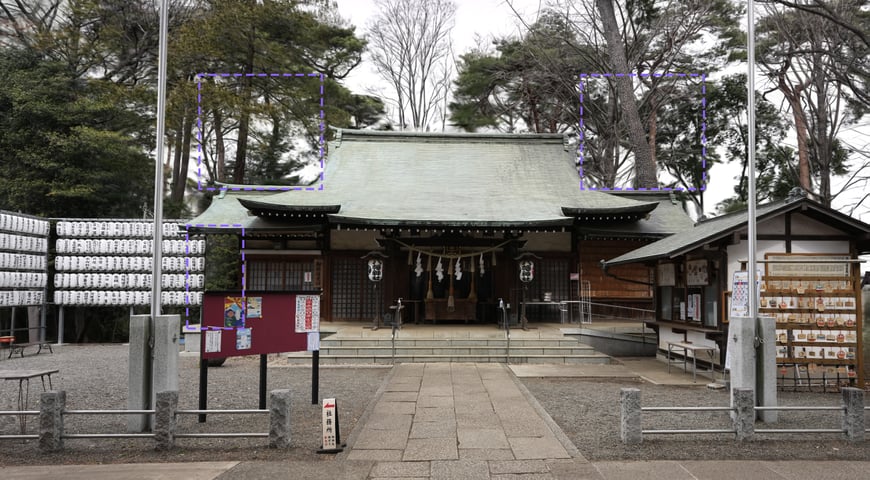
Example of CG asset generation using Venus: Even subjects with complex shapes and textures, such as the vermilion-painted shrine pavilion, stone steps, and trees within the precincts, are reproduced with high-definition quality that blends seamlessly with live-action footage.
The Generation Algorithm: Venus H
This algorithm generates production-quality background CG assets suitable for virtual production shooting. Compared to the results generated by Venus, the quality of detail expression is further enhanced, making it ideal for applications that require more precise data generation. For example, it is best suited when you want to faithfully reproduce minute elements such as the details of distant landscapes, thin ropes, and individual twigs and leaves of trees.
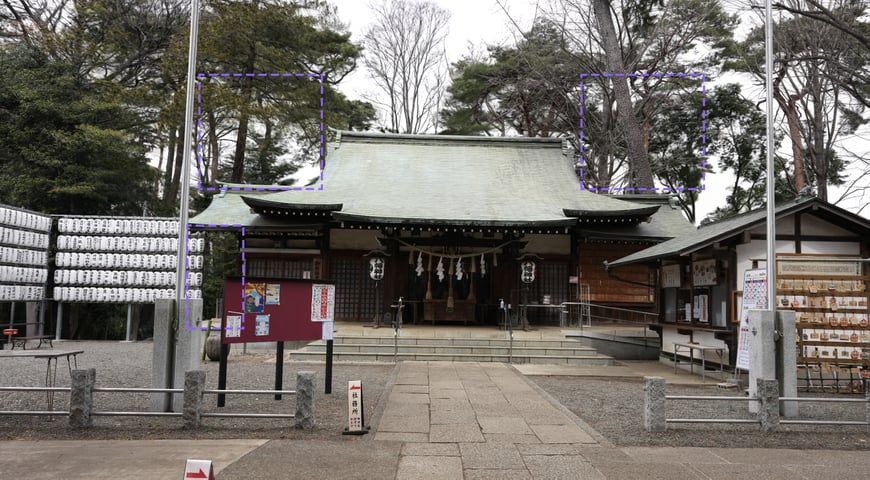
Example of CG asset generation using Venus H: Comparing the same scene with Venus, the reproduction accuracy of the shrine pavilion's roof and the details of the trees within the blue dashed frames is further improved, confirming the high detail-expression quality of Venus H.
Comparison of Generation Algorithms
*Results generated from approximately 100 images
*Generation time and output file size may vary.
Settings During Generation
When you select a generation algorithm, you can configure the generation parameters. If no configuration is required, you can start the generation without making any changes .
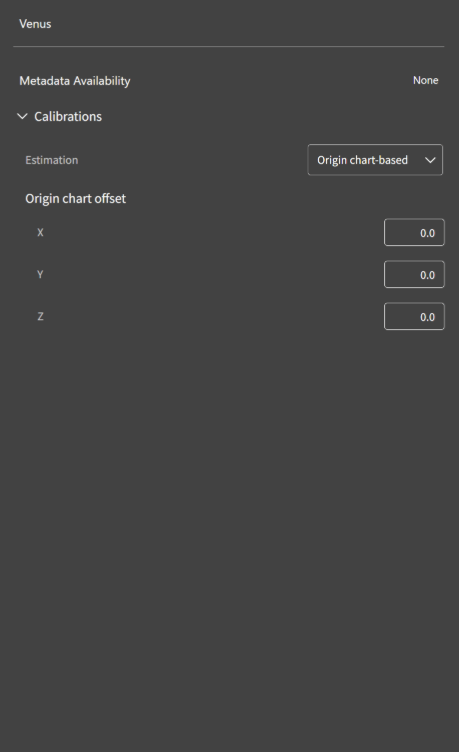
Main Setting Items for Venus and Venus H :
Metadata Availability
Generates data using the metadata acquired via XYN Spatial Scan Navi. By utilizing metadata, you can automatically calibrate the generated data. To use metadata, the automatic upload function (Beta version) of XYN Spatial Scan Navi is required .
Calibrations
Enables calibration of the generation results. By performing calibration, you can set the origin and coordinate axes of the generated results to any desired location. To perform calibration, shooting an origin chart is required .
【Reference】
For detailed calibration methods, please refer to the separate article "How to Configure Calibration Settings During XYN Spatial Scan Generation".
【Note】
Please check the number displayed next to "Remaining" at the bottom of the screen for the number of times each generation algorithm can be executed. If the number of remaining executions is 0, or if your license has expired, the generation algorithm cannot be executed. Note that if an error occurs during generation, it will not be counted as an execution. You can check the expiration date from your account screen. If you wish to purchase a license, please contact us.


