







1. Learning
  2. [Update] SDK 2.1.0 and Firmware 1.20.00 release

[Update] SDK 2.1.0 and Firmware 1.20.00 release

We now provide SDK (Spatial Reality Display Settings) ver. 2.1.0 and Firmware ver. 1.20.00 to improve and add product features.

*Applicable Models: ELF-SR2

With this update, the image quality and performance of the ELF-SR2 are not only more optimized, but also the usability of the ELF-SR2 in various situations is improved.

*To use the following functions, update both SDK and the firmware of ELF-SR2.

The following *1 and *2 image quality improvements need to be updated on the application as well. To maximize the functionality of this update, application developers should replace and rebuild the latest Unity and Unreal Engine Plugins. If the application is not supported, the *1 and *2 effects will not be reflected.

Overview of new and improved functions

For details, refer to the following: Spatial Reality Display Settings


New functions

1. Graphics Processing Setting *1

It is now possible to select "Picture Quality Priority" and "Performance Priority" for image processing. By selecting "Performance Priority" the load on the GPU is reduced, and content with a large amount of heavy data can be displayed smoothly.

2. Usage environment setting

The eye recognition algorithm can now be modified to suit your environment.

3. Viewer switching

Up to two viewers can now be configured to switch between eye recognition targets. The setting can also be assigned to the "Fn key".

4. Crosstalk Adjustment

This allows you to adjust the image quality to suit your audience with less crosstalk.

 Improvements

5. Improved stability of eye detection

A motion prediction function has been added to pupil recognition. Improved detection processing has improved object display stability.

6. Improved stability of stereoscopic images in dark environments

Reduces screen flicker, which is particularly likely to occur in low light environments, resulting in more stable images.

7. Optimization of super-resolution processing *2

Super-resolution processing is optimized to enhance definition.


Downloading Update Files

https://www.sony.net/Products/Developer-Spatial-Reality-display/jp/develop/Setup/DownloadInfo.html

How to Update the Firmware

https://www.sony.net/Products/Developer-Spatial-Reality-display/manual/ja-jp/how-to-update-firmware/

How to Update Spatial Reality Display Settings

Download the Spatial Reality Display Settings installer and follow the instructions to update.

How to check the version

From this version, you can check the version on Spatial Reality Display Setting. Check the version here.
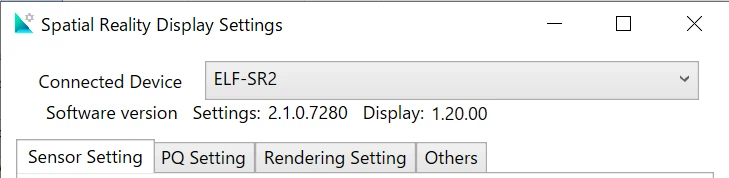
The version is shown in the Spatial Reality Display Settings.

Support information

Tips
Omniverse(Kit App Template) Set up Instruction

Comprehensive guide for setting up NVIDIA Omniverse with Sony's Spatial Reality Display for optimal VR experiences using OpenXR. Follow step-by-step instructions for seamless integration.

Details
Tips
Using Spatial Reality Display (SRD) with Kitware: A Comprehensive Guide

Comprehensive guide on integrating Sony's Spatial Reality Display with Kitware's Paraview and 3DSlicer for enhanced 3D visualization and analysis in research and medical applications.

Details
Tips
Twinmotion to Spatial Reality Display connection

Learn how to connect and use the Sony Spatial Reality Display with Twinmotion, including setup, requirements, and navigation tips for optimal 3D viewing.

Details