
In this article
Instructions on how to start using the XYN Spatial Renderer Plugin.
*As of April 2026, this service is available for corporate customers with accounts. Contact us
*The screen images shown here are for illustrative purposes only and are subject to change.
Basic Operations and Screen Overview
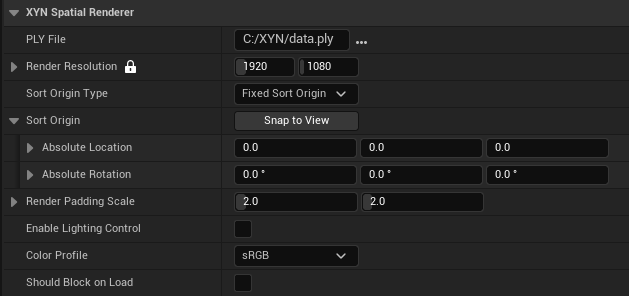
- PLY File:Path to the .ply file to render
- Render Resolution:Render resolution in pixels (Width x Height). Recommended to match your inner frustum resolution.
- Sort Origin Type:Controls the rendering sort order. Use 'Fixed Sort Origin' to reduce flickering when the camera moves.
Follow Camera:Sort by the actual camera position each frame.
Fixed Sort Origin:Sort from a fixed origin to reduce flickering when the camera moves. - Snap to View:Copies the current editor viewport camera position and rotation into the Sort Origin fields.
- Absolute Location:World-space location used as the fixed sort origin.
- Absolute Rotation:World-space rotation used as the fixed sort origin.
- Render Padding Scale:Expands the render area beyond the visible frame to include splats with out-of-view centers. Higher scale factors reduce visual artifacts at the screen edges when the camera moves but increases rendering time.
- Enable Lighting Control:When enabled, receives scene light color and intensity. Directional shading is not applied.
- Color Profile:The color gamut and gamma curve of the source PLY file.
- Should Block on Load:When enabled, .ply loading blocks the game thread until complete.